Convert JPEG 2000 to JPEG on Mac
Select the JPEG 2000 files in Finder, press ⌥ F, choose JPEG and press Return. FileFlip saves each JPEG next to its original and works without an internet connection.
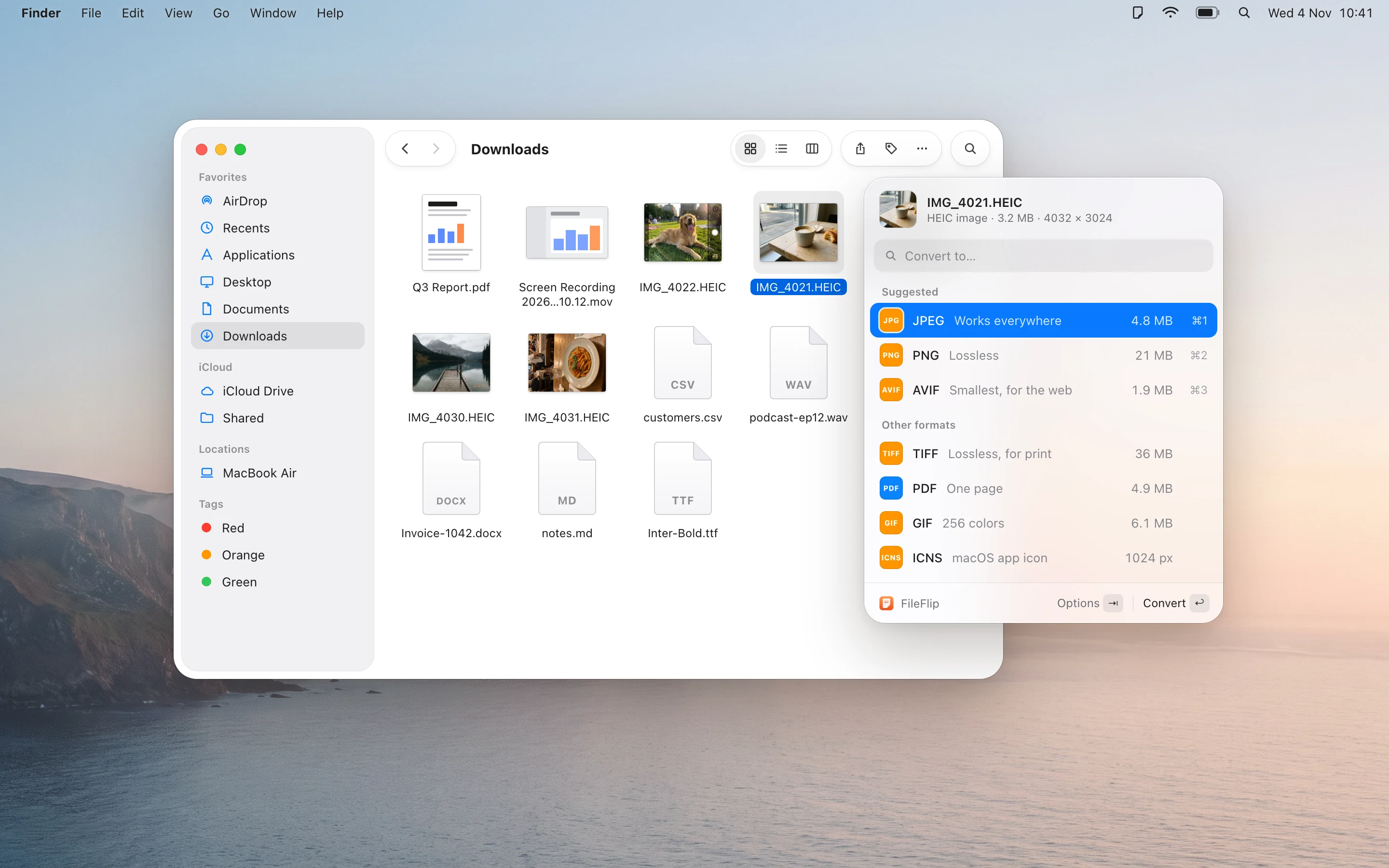
How to convert JPEG 2000 to JPEG with FileFlip
Select the JPEG 2000 files
In Finder or on the Desktop. One file, or a whole folder with ⌘ A.
Press ⌥ F
FileFlip opens next to the selection and lists the formats it can make from JPEG 2000. Type “JPEG” to jump to it.
Choose JPEG and press Return
The JPEG files appear next to the originals. To make them smaller first, press ⇥ and lower the quality or size.
JPEG 2000 and JPEG
JPEG 2000 is rarely supported outside specialist software. JPEG opens everywhere, from email and websites to Windows PCs and photo printing services.
What changes when you convert
- JPEG is lossy: the file gets much smaller and some fine detail is discarded. At high quality settings the difference is hard to notice.
| Property | JPEG 2000 | JPEG |
|---|---|---|
| Full name | JPEG 2000 | Joint Photographic Experts Group |
| Made by | Joint Photographic Experts Group | Joint Photographic Experts Group |
| Introduced | 2000 | 1992 |
| Compression | Lossy or lossless (wavelet) | Lossy |
| Transparency | Yes | No |
| Best for | Archiving and professional imaging | Photos you want to send, upload or print anywhere |
| Opens in | Preview and professional imaging tools; most browsers and many apps don’t open it | Every computer, phone, browser and photo app |
| File extension | .jp2 | .jpg, .jpeg |
| In FileFlip | Opens and saves | Opens and saves |
Other ways on a Mac
For one file now and then you may not need FileFlip. These work with what’s already on your Mac.
Preview
Open the JPEG 2000 in Preview, choose File → Export, pick JPEG from the Format menu and click Save. For several files, open them together, select all thumbnails in the sidebar and choose File → Export Selected Images.
Good for a few files now and then.
Terminal
The sips command converts images in place or into a new file.
sips -s format jpeg image.jp2 \
  --out image.jpg
Built into macOS and good for scripts. Run sips --formats to see what your macOS version can read and write.
Questions about JPEG 2000 and JPEG
Does converting JPEG 2000 to JPEG lose quality?
JPEG is lossy: the file gets much smaller and some fine detail is discarded. At high quality settings the difference is hard to notice.
Can I convert many JPEG 2000 files at once?
Yes. Select them all in Finder, press ⌥ F and choose JPEG. Progress moves to the menu bar, so you can close the panel and keep working.
Where is the JPEG file saved?
Next to the original, with the same name and the .jpg extension. The JPEG 2000 file isn’t changed. In Settings you can choose a different folder instead.
Can I convert JPEG back to JPEG 2000?
Yes, FileFlip converts JPEG to JPEG 2000 as well.
Are my files uploaded anywhere?
No. FileFlip converts files on your Mac and works with the internet turned off.
Convert a whole folder of images at once
FileFlip also handles video, audio, PDFs, documents and data files. Requires macOS 14 Sonoma or later.
Coming soon for Mac